Source Citation Data
 One of the most basic best-practices in doing family history research is to cite the source
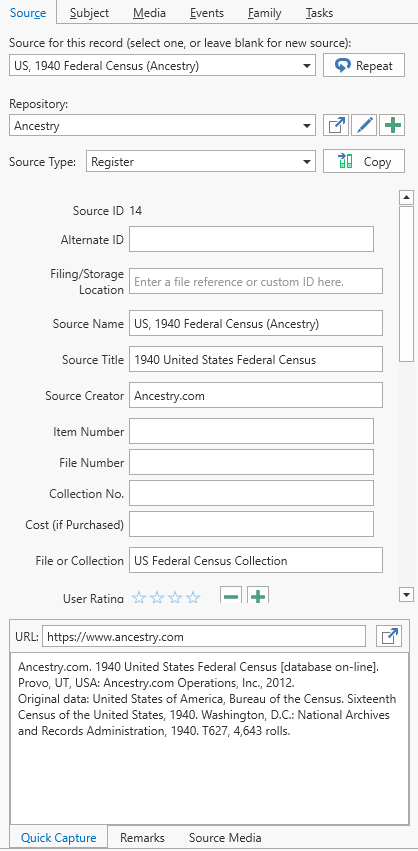
 A source record in Clooz should be viewed as the higher level components of a source citation. Citation details are pulled from the citing Information Record. of the information being entered. For a description of the source records in Clooz, see the Clooz data organization topic. Source records are listed on the main screen Source tab, where the Source editor can be used. However, Source records can also be created or edited within the Information Editor using the Source tab its right-side panel.
You have several ways to cite the source data using this panel:
-
Use an existing source, as is, by selecting it in the drop-down list at the top of the panel.
-
Use the same source cited by the previous Information Record
Information Records in Clooz hold the content information coming from a document or other source. These differ from a Source record that contains most of the citation information describing the docment, or the Repository record referring to the facility or online service where the document was found. edited by clicking the Repeat button. -
Use an existing source as a template for further tailoring of details by selecting it in the drop-down list at the top of the panel, and then click the Copy button to start a new source containing the data from the existing one.
-
Start a new source from scratch by leaving the source selection box at the top of the panel blank. Select the desired Repository
Where a source document or item was found. This could be a physical library facility or online data provider. and Source Types, then edit the rest of the fields.
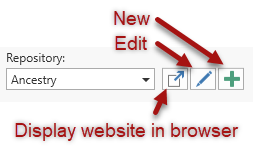
When editing a Source, the Repository can be changed by selecting a different one from the drop-down list, or click one of the button functions provided.
At the bottom of the panel is a set of three tabs providing additional functions:
- Use the Quick Capture area to deposit source citation information. For example, if you are gathering data from a web site that displays a block of source citation data, copy and paste the contents of that block into this field. A field is also provided to paste the URL address of web sites for easy retrieval (not recommended for long term reference since web sites frequently change). The priority here is to capture the information needed for an accurate citation. Getting it into the desired format can happen later.
- The Remarks tab provides space for you to put in general remarks about the source document.
- The Source Media A digital file containing an image, text, spreadsheet, video, audio, or any other format. These can be attached to various records in Clooz as digital representations of source document content, or as Information Records (as photographs, maps, videos, or audio independent of a specific source document). tab displays a list of the media files attached to this Source record. Files can be added by right-clicking in the box to display the context menu. For more complete control of the media files attached to the Source, use the Source editor.